Considering the fact that I never even knew that databases could be created from scratch by the common computer user, it's safe to say that I started at ground zero with this project. What did I learn from this project? Everything I now know about creating and utilizing databases. It's great how you can take an Excel spreadsheet, export it into FileMaker Pro, and then create a database that you can tweak and organize for the highest possible convenience. The uses of finds, forms, and reports are great tools and very easy to use. This project kind of reminded me of the Excel project, but for me this program was less complex and more user friendly.
A business owner should definitely take advantage of the "sort" and "find" tools. These tools are, in my opinion, the most useful in creating an organized database. I really like the sort tool because the database user/creator can organize the database how they want it to be organized. For example, on the database project, the raw information needed to be sorted by city and then, within the city field, by their leave date in descending order. With the sort tool, all of the options necessary to make this happen are only a few clicks away and then - TADA! You got a sorted database. In addition, the find tool is just as useful because it helps you find what you need without even sorting the information. All you need to do is fill in what you're searching for in the specific fields and then everything you're searching for is there.
Sunday, November 6, 2011

Wednesday, November 2, 2011
Week 11: Clear on Data vs. Information
 This week I was actually shocked at how easily I understood the information in comparison to past weeks. The lecture I found most interesting and easy to understand was the Data vs. Information lecture. In the past, I have used the terms data and information interchangeably, but after reading and watching this lecture, I'll most likely never catching myself making that mistake again. In fact, I may even correct other people when using the two terms incorrectly because if this lesson has taught me anything, it is that they are not the same.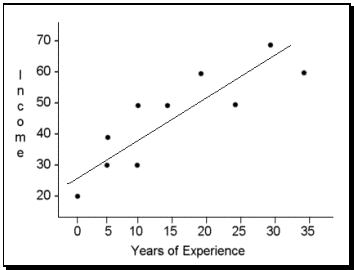
The example used in lecture illustrated this concept perfectly. Take a scatter spot of raw data. Alone, they are just clusters of data, but the data becomes information when a correlation in the scattered dots is recognized and formed. I like to think as the transformation of data into information as a growth, in which the data is young and the information is mature. And like any other kind of growth, there is always more room to mature.
Photo 1: Public Domain: http://www.infogineering.net/wp-content/uploads/2009/08/model.jpg
Photo 2: Public Domain: http://allpsych.com/researchmethods/images/scatterplot.gif
Sunday, October 30, 2011
Week 10: Database Scavenger Hunt
Creating databases was something completely new to me, so this scavenger hunt was definitely very helpful and will hopefully facilitate me with next week's database assignment. I thought it was awesome how each lecture covered a different aspect of how to create databases - definitely helpful.
 My favorite aspect of databases are queries. They are so convenient! A query is like one big "find" button. It can help you find almost anything you're looking for whether it be broad or narrow as long as the specified fields are present. The fact that you can also save past queries as well as sort multiple fields makes databases a lot more convenient and a lot easier to maneuver.
Forms and reports are also very helpful and very convenient. Both of which are really great organizational tools. Whether it be creating a header or grouping data by fields, both forms and reports are the solutions.
Overall, I find creating databases to be very interesting, and definitely helpful when organizing information or trying to output information in an easy and understandable way. I'm anticipating next week's project to see how I can put my newly learned database skills to work.
Photo: Public Domain: http://russia-ic.com/img/education_science/05.03.2008%20Computer.jpg
Forms and reports are also very helpful and very convenient. Both of which are really great organizational tools. Whether it be creating a header or grouping data by fields, both forms and reports are the solutions.
Overall, I find creating databases to be very interesting, and definitely helpful when organizing information or trying to output information in an easy and understandable way. I'm anticipating next week's project to see how I can put my newly learned database skills to work.
Photo: Public Domain: http://russia-ic.com/img/education_science/05.03.2008%20Computer.jpg
Sunday, October 23, 2011
Excel Project
There's only one word to describe this assignment: frustrating. This assignment was simple once the proper tools were used, but the search in finding the necessary tools to complete the specific instructions was my downfall. However, this project definitely got me more familiar with the Excel program. I learned a lot more than I initially thought I would, and I am definitely going to use some of the features I learned through this project in the future.
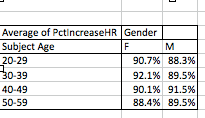
I am a pretty avid excel user, but because I never had such large amounts of data, I never utilized any of the data analysis tools or shortcuts taught via this project. The best thing I learned from this project was definitely pivot tables. Pivot tables are convenience at its best. The raw data sheet took me a while to do, but the pivot tables were quick, easy, and accurate. Simplicity and accuracy were equally as perfect, and therefore I found the pivot tables to be an awesome new addition to my excel knowledge.
The one thing that really irked me were the formulas. There are so many of them! I find them confusing, but like anything else, it takes practice to become better acquainted with them. I still can't efficiently use the functions because I get confused on which ones to use. However, once I become familiar with the functions after continuously using them, it will definitely increase my efficiency when using and/or creating excel documents.

I am a pretty avid excel user, but because I never had such large amounts of data, I never utilized any of the data analysis tools or shortcuts taught via this project. The best thing I learned from this project was definitely pivot tables. Pivot tables are convenience at its best. The raw data sheet took me a while to do, but the pivot tables were quick, easy, and accurate. Simplicity and accuracy were equally as perfect, and therefore I found the pivot tables to be an awesome new addition to my excel knowledge.
The one thing that really irked me were the formulas. There are so many of them! I find them confusing, but like anything else, it takes practice to become better acquainted with them. I still can't efficiently use the functions because I get confused on which ones to use. However, once I become familiar with the functions after continuously using them, it will definitely increase my efficiency when using and/or creating excel documents.
Wednesday, October 19, 2011
Week 9: Clear on Kaku's view on the future of technology

The main reason why I loved Dr. Kaku's take on the future of technology is because he made his predictions based on science, not just theory. Science is concrete. It's not just an estimate or a guess -- it's real.
Dr. Kaku, a theoretical physicist, said that Moore's Law has been in operation in our society for the last 100 years, but it is destined to come to a halt because it cannot last forever because silicon chips become unstable at a molecular level. The question is: when will this halt occur? The answer is unknown, but Kaku says that the danger zone is now.

Dr. Kaku has a lot of awesome ideas and he explains them all in such a way that it's very thoroughly explained, but very easily understandable. Check out some of his ideas via video on this website: http://bigthink.com/michiokaku.
Photo1 - Dr. Michio Kaku - Public Domain: http://www.londonspeakerbureau.in/Michio_Kaku.aspx
Photo 2 - iRobot - - Public Domain: http://memebox.com/futureblogger/show/1391
Thursday, October 6, 2011
Presentation
Check out my presentation at this link: http://youtu.be/sU9uEjgL-L4
My presentation was on the importance of teamwork in the workplace. the thesis statement, or lead, of the project was that teamwork improves efficiency and enhances effectiveness through collective effort rather than by individual thought alone.
There is definitely a logical flow and sequence of the content. It is easy to understand and difficult to retort. If I could improve one thing, it would probably be a more concise concluding slide. The reason why i think the sequence is so logical is because I ask questions, leave it a little time to linger, and then answer them almost right away so that the audience understands the content. I don't see any missed questions that could have possibly came up within a 3-minute time frame. Moreover, my presentation had a theme - "Come Together," and the color scheme and music blended well, which is why I think my presentation definitely captured attention, especially by the second slide.
It's definitely clear that I'm an advocate for teamwork in the work environment and trying to persuade people to utilize it more often than individual thought. I validate my claims by providing the reasons of how teamwork creates effectiveness and efficiency and also how to use it in the real world. I had no typos nor unbelievable claims. There is enough information for the audience to understand what I am presenting, but I got my point across without cluttering up my slides. I originally had voice narration, but I realized that my presentation caught more attention and was more entertaining when I replaced it with music.
My presentation was on the importance of teamwork in the workplace. the thesis statement, or lead, of the project was that teamwork improves efficiency and enhances effectiveness through collective effort rather than by individual thought alone.
There is definitely a logical flow and sequence of the content. It is easy to understand and difficult to retort. If I could improve one thing, it would probably be a more concise concluding slide. The reason why i think the sequence is so logical is because I ask questions, leave it a little time to linger, and then answer them almost right away so that the audience understands the content. I don't see any missed questions that could have possibly came up within a 3-minute time frame. Moreover, my presentation had a theme - "Come Together," and the color scheme and music blended well, which is why I think my presentation definitely captured attention, especially by the second slide.
It's definitely clear that I'm an advocate for teamwork in the work environment and trying to persuade people to utilize it more often than individual thought. I validate my claims by providing the reasons of how teamwork creates effectiveness and efficiency and also how to use it in the real world. I had no typos nor unbelievable claims. There is enough information for the audience to understand what I am presenting, but I got my point across without cluttering up my slides. I originally had voice narration, but I realized that my presentation caught more attention and was more entertaining when I replaced it with music.
Week 7: Software in Flux - Clear on Virtualization
 Virtualization is awesome. It's almost as if it's a master of disguise -- one person in many different outfits. Virtualizaion is actually a type of software that allows computers, single or in connected clusters, to fucntion as if they were several different computers. Crazy, right? The name is self-explanitory in itself -- "a virtual version of something" rather than a concrete piece of hardware. Each one seems as though it is numerous computers, each running on it's own operating system and software.
Moreover, the best thing about virtualization is that it supports most cloud computing efforts and can therefore make computing more efficient and affordable because users only need to pay as needed. Faster and cheaper? PERFECT. You can have less servers taking up space in that server room of yours -- goodbye, clutter. It also improves scalability and lightens work loads. One popular example of a virtualization system is VMWare.
I also took it upon myself to do a little research once again., and I must say that if I never need to know everything about virtualization, at least I always know I'm a few clicks away from this site: http://virtualization.info/en/. It's virtualization mania.
Photo 1 - Public Domain: http://houston.theoffside.com/files/2009/05/disguise.jpg
Photo 2 - Public Domain: http://commons.wikimedia.org/wiki/File:Cost_chicanery.jpg
Subscribe to:
Posts (Atom)